·5 min read
Claude Code Subagents: A Working Guide for Real Projects
Claude Code subagents are specialist assistants with their own context window. Here is how they are defined, how Claude picks them, and how to build one that earns its place.
A Claude Code subagent is a specialist assistant that works in its own context window. You give it a job, a set of tools and a short system prompt. It does the work away from your main conversation, and sends back a summary.
That isolation is the point. A subagent keeps long search results, log output and file contents out of your main session. This guide covers how subagents are defined, how Claude chooses one, and how to build one that earns its place.
TL;DR
- A subagent has its own context window, system prompt and tool access.
- It is defined in a Markdown file with frontmatter.
nameanddescriptionare required. - Claude delegates by matching the task to the
description. - Give each subagent the smallest tool list that does the job.
- Use subagents for isolated work, not for every small question.
What a subagent gets, and what it does not
Each subagent starts with a fresh context window. It does not see your conversation history, and it does not see files Claude has already read in your session. Its starting context holds its system prompt, the delegation message Claude wrote for it, your CLAUDE.md files, git status and any skills you preload.
When it finishes, only its summary returns to your main conversation.
That has two consequences. First, the task Claude writes for the subagent has to carry everything it needs, because the subagent works from that message and the context listed above. Second, a subagent is a poor fit for a task where you want to watch each step, because you only see the result.
Claude Code also has built-in subagents. Explore is a fast, read-only agent for searching a codebase. Plan is a read-only research agent used in plan mode. General-purpose handles complex, multi-step work with every tool available to subagents. You do not need to write these three.
Defining a subagent
A subagent is a Markdown file. The frontmatter sets its rules, and the body becomes its system prompt. Here is a small code reviewer:
---
name: code-reviewer
description: Reviews code for quality and best practices. Use proactively after code changes.
tools: Read, Grep, Glob
model: sonnet
---

You are a code reviewer. When invoked, read the changed files and report
specific, actionable issues on correctness, security and clarity.
Do not edit files.
The fields that matter most:
nameis the unique identifier. It can be up to 256 characters.descriptiontells Claude when to delegate. Write it as a trigger, not a label.toolsis an allowlist. If you leave it out, the subagent inherits every tool available to subagents.disallowedToolsis a denylist. It removes tools from the inherited or listed set.modelpicks a model, such assonnetorhaiku, orinheritto use the main conversation's model.maxTurnscaps how many turns the subagent can take before it stops.effortsets how hard it thinks, fromlowtomax.
Where the file goes
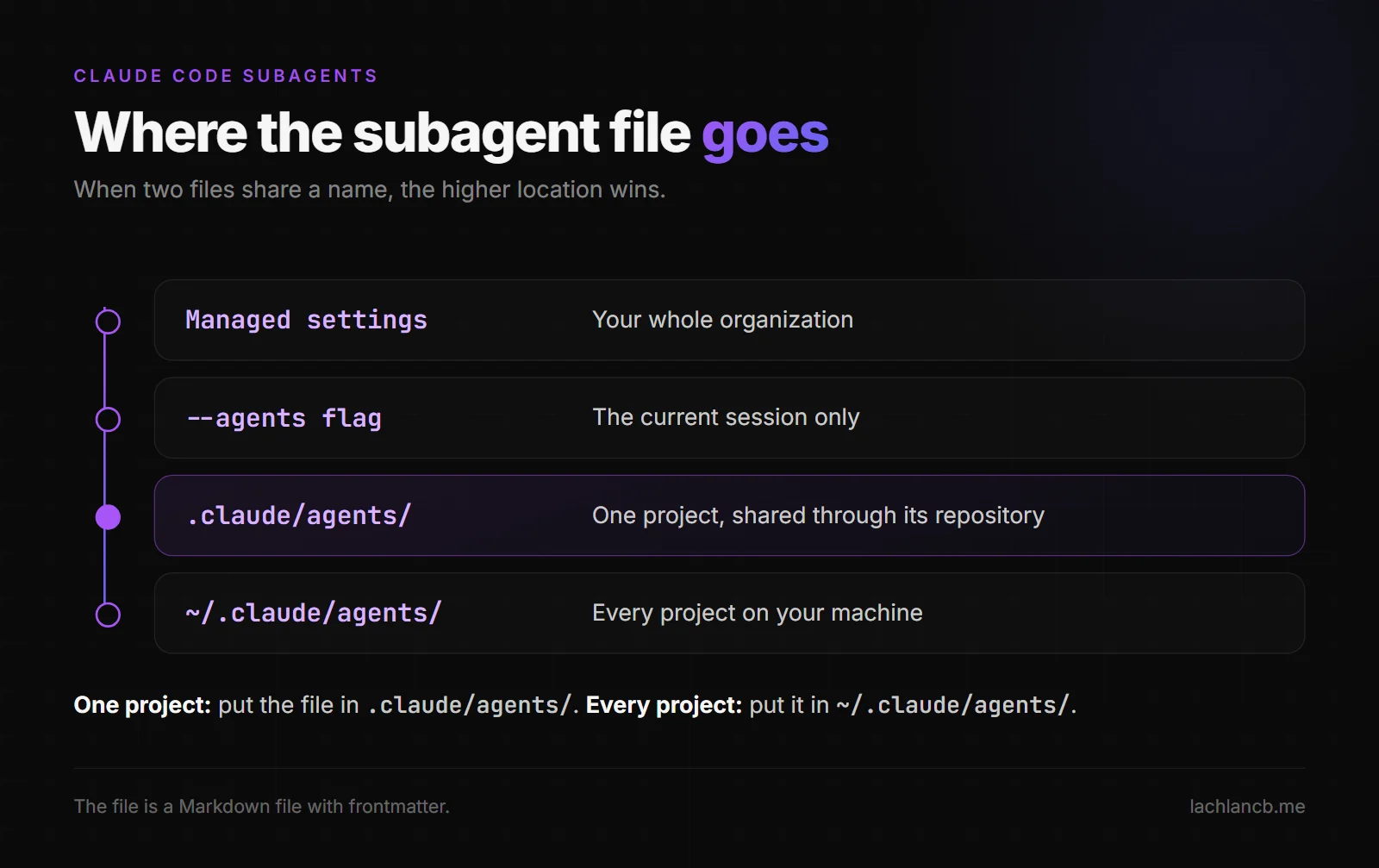
Subagent files live in a few places, and the higher-priority location wins when names clash:
| Location | Scope |
|---|---|
| Managed settings | Your whole organization |
--agents flag | The current session only |
.claude/agents/ | One project, shared through its repository |
~/.claude/agents/ | Every project on your machine |
For one project, put the file in .claude/agents/. For every project on your machine, put it in ~/.claude/agents/.
How Claude chooses one
Claude matches the task in front of it against each subagent's description. Adding "use proactively" to a description encourages Claude to delegate.
You can also call one on purpose. Ask in plain language, such as "use the code-reviewer subagent on these changes". Or @-mention it. To make a whole session run as one subagent, start Claude with claude --agent code-reviewer.
Give each one a narrow job
A subagent that does one job well beats a general one that does everything. Three rules I would follow:
- Limit the tools. A reviewer needs Read, Grep and Glob. It does not need Write or Edit.
- Write the description as the trigger. Name the task and the situation. "Reviews changes to the billing code before a merge" tells Claude when to use it. "A helpful reviewer" does not.
- Set a turn limit. Use
maxTurnson any subagent that reads a lot of files, so one run cannot wander.
Use one when the work is large, noisy or separate from what you are doing right now.
Limits to know
- Subagents can start their own subagents, up to three layers deep by default.
- Up to 20 subagents can run at once by default.
- Background subagents get a smaller built-in tool set than foreground ones.
- Plugin subagents ignore the
hooks,mcpServersandpermissionModefields for security reasons. - A subagent file with no name is skipped silently. A file with a name but no description is skipped, and the reason goes to the debug log.
What a subagent costs
Subagent requests count toward the same usage limits as your main conversation. A subagent that reads twenty files uses tokens for all twenty, even though you only see its summary. That is the trade. You pay tokens to keep your main session clean.
If the work is short, do it directly. If it is long and noisy, a subagent is worth the cost.
How I use them
I run a set of named agents, each with one role, and each defined the same way: a file, a narrow tool list and a description that names the task. Pick the one job, cut the tools to the minimum, and write the trigger so the choice is obvious.
My guide to the self-learning setup covers how rules get updated over time, and how I run my agency from one terminal covers the wider setup these agents sit inside.
Not sure which system to build first? Book an AI discovery call and I'll walk you through it.