·7 min read
How I Run My Entire Agency From One Terminal Window
How I use Claude Code to run an agency, publish content, manage servers, and orchestrate my entire business from one terminal window.
I run a marketing agency, manage a VPS, publish across four websites, maintain a CRM, write cold emails, deploy automations, and generate content — all from a single terminal window. No browser tabs. No switching between apps. Just Claude Code and a command line.
This isn’t a flex. It’s an operating system. And it’s the reason I can do more in a day than I could in a week two years ago.
The Stack That Makes It Possible
My setup connects Claude Code to every tool I use through APIs and MCP (Model Context Protocol) servers. Think of MCP as a universal adapter — it lets Claude talk directly to external services without me touching a GUI.
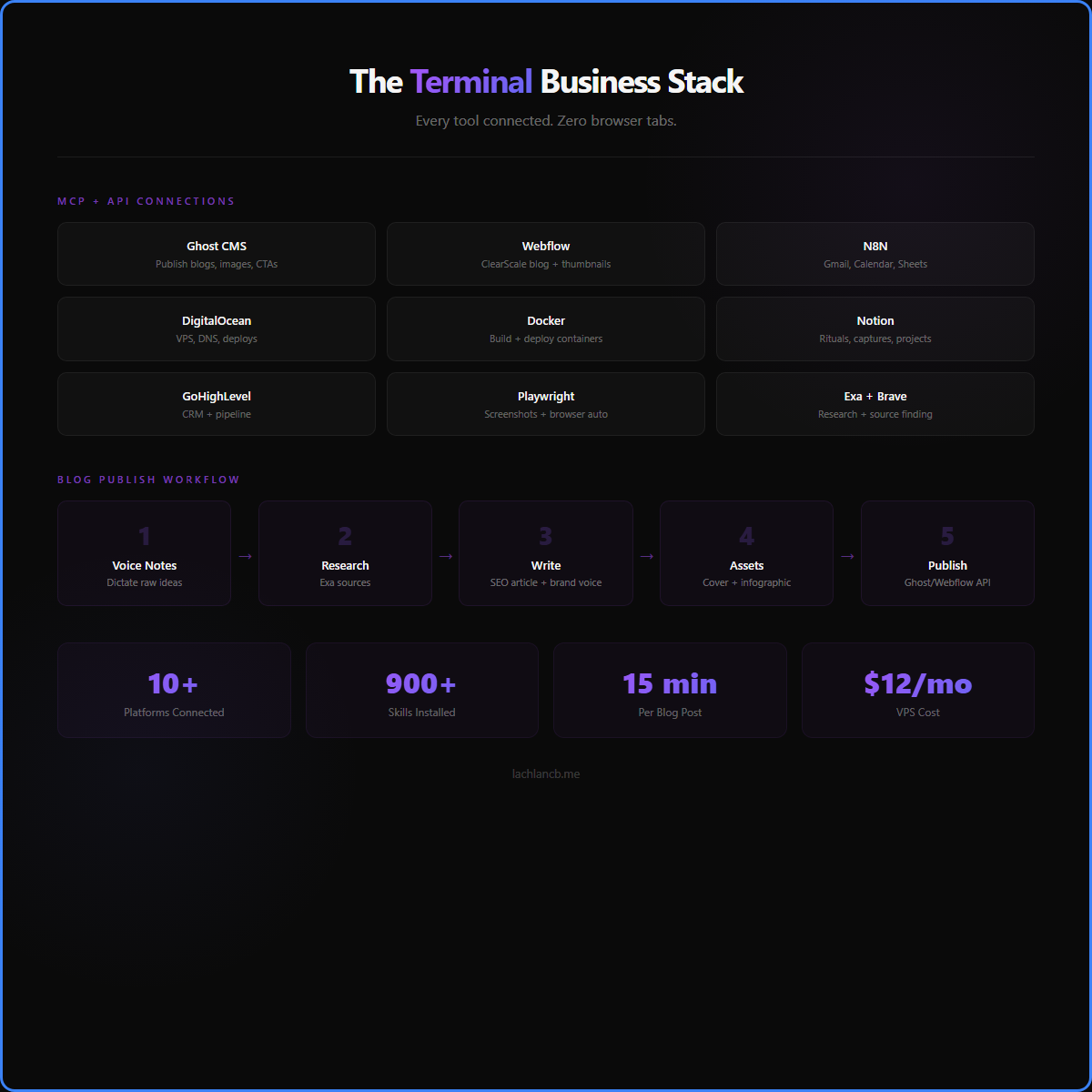
Here’s what’s connected:
- Ghost CMS — publish blog drafts, attach cover images, inject CTAs. I wrote and published four articles today without opening the Ghost editor once.
- Webflow CMS — push Clearscale blog posts, attach thumbnails, set categories. All via REST API from the terminal.
- N8N — my automation backbone. Gmail, Google Calendar, Google Sheets all route through N8N webhooks on my VPS. One curl command reads my inbox or checks my calendar.
- DigitalOcean — manage my droplet, DNS records, and deployments without logging into the dashboard.
- Docker — build, deploy, and monitor containers on the VPS remotely. LangGraph, Qdrant, Langfuse, N8N — all managed from here.
- Google Workspace — read Drive files, search docs, export data. Service account handles reads; N8N handles writes.
- Notion — daily rituals, content captures, project tracking. Create pages, update databases, all via API.
- GoHighLevel — CRM operations, pipeline management, client communication.
- Playwright — browser automation for screenshots, site verification, and testing. No need to open Chrome.
- Exa + Brave — web research, competitor analysis, source finding for articles. All from the same window.
That’s 10+ platforms I never need to open in a browser. The terminal is the interface. Claude Code is the operator.
What a Typical Day Looks Like
This morning I published a blog post about skills being commoditised in the AI age. Here’s what happened:
- I dictated raw notes via voice (Windows Voice Access)
- Claude Code researched sources using Exa search
- It wrote a 1,300-word SEO-optimised article in my brand voice
- Generated an HTML cover image template, screenshotted it with Playwright
- Created an infographic summarising the key concepts
- Published the draft to Ghost via Admin API
- Uploaded and attached the cover image and CTA card
- Wrapped the CTA in a Calendly link
Total time: about 15 minutes. I never left the terminal.
Then I did the same for a Clearscale blog post on Webflow. Then an Atomic Habits synthesis for The 20% Vault. Then a vlog intro post. Four complete blog drafts with cover images in one session.
Why the Terminal Beats Every Other Workflow
There’s a reason developers live in the terminal. It’s the fastest interface that exists. No loading screens. No clicking through menus. No waiting for a dashboard to render.
But the real power isn’t speed — it’s composability. Every action I take can be chained, repeated, and automated. Publishing a blog post isn’t a manual 12-step process anymore. It’s a script that runs the same way every time.
This is what I mean when I talk about systems over goals. The goal is “publish 4 blog posts.” The system is a terminal workflow that makes publishing frictionless. Once the system exists, the output becomes inevitable.
The Skills That Downloaded Themselves
Claude Code has a skills system — literal downloadable capabilities that give it expertise in specific domains. I have over 900 installed. Blog writing. SEO optimisation. Cold email drafting. Server management. Instagram content planning. Sales scripts.
Each skill is a structured prompt with brand guidelines, workflows, and quality checks baked in. When I run /blog-draft personal, it knows my voice, my audience, my SEO rules, and my publishing pipeline. I don’t brief it. It already knows.
This is the part that changes everything. I’m not prompting an AI. I’m operating a system that has my entire business context loaded. It knows my Ghost API keys, my Webflow collection IDs, my CRM setup, my keyword targets, my brand voice across four different platforms.
What This Actually Means for Productivity
I’m busier than I’ve ever been. But it’s a different kind of busy. I’m not doing more work. I’m doing more things.
In the past, writing one blog post was a half-day affair. Research, write, edit, format, find images, upload, set metadata, publish. Now the bottleneck is my thinking — the ideas, the raw notes, the direction. The execution is handled.
This frees me to focus on what actually matters:
- Sales calls — the human work that AI can’t replace
- Strategy — deciding what to build, not how to build it
- Relationships — clients, partners, the people who matter
- Content direction — I still write the raw notes. Claude Code turns them into finished pieces.
The Ecosystem at Scale
Here’s what runs on my $12/month VPS without me touching it:
- Daily Engine — morning briefing, diary sync, productivity tracking
- Weekly Intelligence — stock watchlist, Reddit scanning, newsletter digest, synthesised into one report
- Creator Digest — competitor content scraped and summarised daily
- Dashboard Generator — regenerates my ops dashboard every 30 minutes
- OAuth Refresh — keeps Google tokens alive automatically
- Telegram Bridge — send a message to a bot, Claude executes on the VPS
All of this runs as cron jobs. I built it once. It compounds forever.
Why Everyone Should Try This
You don’t need my exact setup. But the principle applies to anyone running a business:
- Connect your tools via API. Every SaaS you use has an API. The terminal can talk to all of them.
- Invest in context, not prompts. Build a system that already knows your business. CLAUDE.md files, skills, memory systems — the upfront work pays dividends every session.
- Automate the boring middle. The creative work (ideas, direction, voice) stays human. The execution (formatting, publishing, uploading) gets automated.
- Start with one workflow. Pick the task you do most often. Automate it. Then do the next one.
The terminal isn’t just for developers anymore. It’s for anyone who wants to operate at a level that wasn’t possible two years ago.
FAQ
Do I need to know how to code?
No. Claude Code writes the code. You need to know what you want to achieve and how to describe it clearly. The technical execution is handled by the AI.
How long did it take to set this up?
The core system took about 2-3 weeks of building in evenings. But it compounds — every skill I add, every API I connect, makes everything else faster.
Is this just for content creators?
No. Any business with repetitive workflows benefits. Sales outreach, CRM management, reporting, client onboarding — anything with steps that repeat.
What does this cost?
Claude Code subscription plus a $12/month VPS. That’s it. The ROI is absurd compared to hiring for each individual task.
That terminal setup is the engine room. For the full picture of what a modern agency looks like across sales, delivery, and ops, see I Replaced My Agency Team With AI Decision Making — the lean stack that replaces a team.
Running the agency from one terminal is one half of the picture. The other half is the layer that sits above your tools and operates them — see Your Next Management System Isn't an App — It's Claude Code — why Claude Code is becoming the system that runs everything.