·9 min read
My AI Learns From Its Own Mistakes. Here's the Architecture.
Five layers of self-learning infrastructure that make Claude Code remember failures, preserve context, and get smarter every session.
Every conversation with an AI starts from zero. You explain your project. You re-state your preferences. You watch it make the same mistake it made yesterday.
I got tired of that about six months ago.
So I built a system where my Claude Code instance learns from its own failures, remembers what works, and gets measurably better every session — without me doing anything.
This isn't a prompt trick or a plugin. It's an architecture. Five layers deep, running 24/7 on a $24/month VPS. And it's the single biggest force multiplier in my business.
Here's exactly how it works.
The Problem: AI Amnesia
Claude Code is the most capable coding tool I've ever used. I've run my entire agency from it. I've replaced my backend team with it. I've built custom skills that automate entire workflows.
But out of the box, it forgets everything between sessions.
Every new conversation is a blank slate. The thing that crashed your Docker container yesterday? It'll try the exact same command today. The SSH key path that only works with forward slashes on Windows? It'll use backslashes again. The N8N webhook format that silently fails if you use the wrong body parameter? Same mistake, different day.
The fix isn't "better prompts." The fix is infrastructure.
The Architecture: Five Layers of Self-Learning
My Claude Code setup has five distinct layers that work together to create something that genuinely improves over time. Each layer handles a different type of learning.
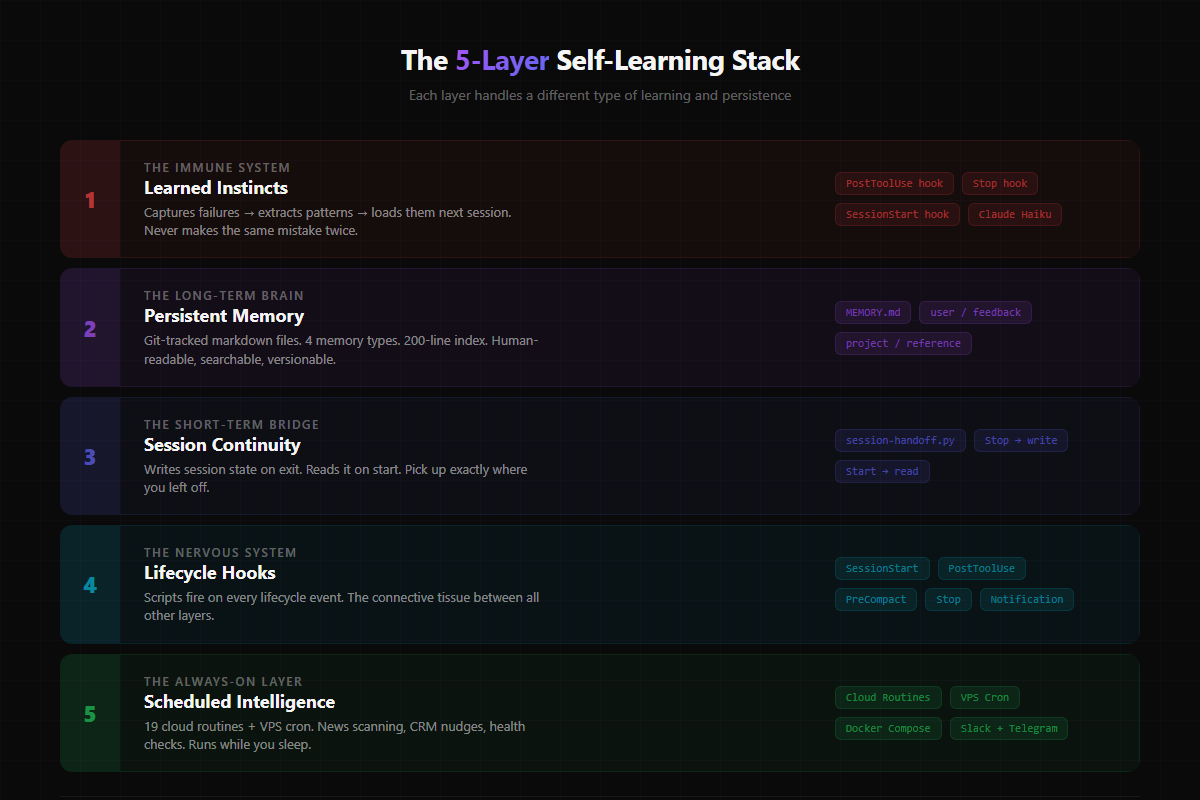
Layer 1: Learned Instincts (The Immune System)
This is the crown jewel. Three Python scripts that form a closed feedback loop:
Step 1 — Capture failures in real-time. A hook fires after every tool use. If a Bash command fails — permission denied, syntax error, file not found, whatever — the error gets logged to a temporary file with the command that caused it.
Step 2 — Extract patterns at session end. When I close a session, another hook reads all the failures from that session. It sends them to a lightweight AI model (Claude Haiku — fast and cheap) with a prompt that says: "Given these failures, what's the actionable lesson? One line per pattern. Skip anything you've already learned."
Step 3 — Load instincts at session start. Next session, a startup hook loads every learned pattern into the conversation context. Claude sees them before I type a single character.
The result? My instance currently has 12 learned instincts. Things like:
- "Shell escaping: write complex prompts to temp files, don't pass inline via
su -c" - "Always run Claude Code as the agent user on the VPS, never as root"
- "When editing docker-compose.yml, insert services inside the services block, not append to end of file"
- "OAuth code verifiers must be saved between URL generation and token exchange (PKCE flow)"
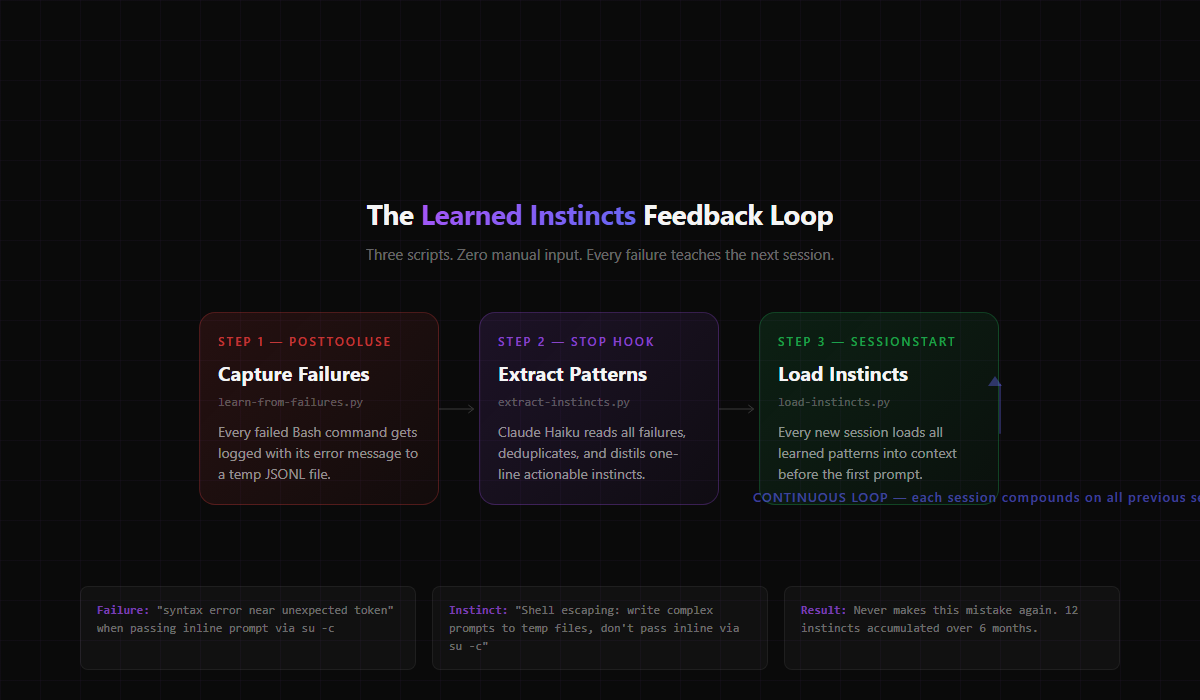
Every single one of these came from a real failure. I didn't write them. The system extracted them from what went wrong, and now it never makes those mistakes again.
It even sends me a Telegram notification when new instincts are learned and syncs the file to my VPS for dashboard visibility.
Layer 2: Persistent Memory (The Long-Term Brain)
Claude Code has a built-in memory system, but I've structured mine specifically for how I work.
There's a master index file (MEMORY.md) that acts as a table of contents — capped at 200 lines so it doesn't bloat the context window. Each entry is a one-line pointer to a detailed memory file.
Memory files have four types:
- User memories — who I am, how I work, what I prefer
- Feedback memories — corrections I've given ("don't mock the database in tests"), validated approaches that worked
- Project memories — ongoing work context, decisions, deadlines
- Reference memories — where to find things in external systems
The key insight: memories are git-tracked markdown files, not some opaque database. I can read them, edit them, version them, and search them with grep. When something becomes outdated, I update or delete the file. No black box.
Layer 3: Session Continuity (The Short-Term Bridge)
Between the permanent memory system and the learned instincts, there's a gap: what happened in the last session specifically?
Two hooks handle this:
Session handoff (write) fires when a session ends. It captures the modified files, active tasks, scratchpad context, and current branch — everything the next session needs to pick up where this one left off.
Session handoff (read) fires when the next session starts. It loads that context back in. So if I was debugging a Docker networking issue at 11pm and pick it back up at 9am, Claude already knows what I was doing, what files I changed, and what I was trying to fix.
This is the difference between "here's a fresh AI" and "here's your AI, right where you left it."
Layer 4: Hooks (The Nervous System)
Claude Code supports lifecycle hooks — scripts that fire at specific moments during a session. I have hooks on almost every lifecycle event:
- SessionStart — loads instincts, reads last session handoff, syncs VPS credentials, initialises memory
- PostToolUse — captures failures for the instinct system, auto-backs up config files when they change
- PreCompact — preserves critical context before the conversation gets compressed (Claude Code auto-compresses long conversations)
- Stop — extracts instincts, writes session handoff, logs session to VPS, syncs state
- Notification — desktop alerts when Claude needs approval for something
The hooks are the connective tissue. Without them, the other layers don't communicate. With them, every session automatically starts smarter and ends by teaching the next one.
Layer 5: Scheduled Intelligence (The Always-On Layer)
The final layer runs without me being present at all.
I have a DigitalOcean VPS running Docker Compose with seven services: N8N (workflow automation), LangGraph (AI agent API), Qdrant (vector memory), PostgreSQL, Redis, Langfuse (agent tracing), and a static asset CDN.
On top of that, I run 19 scheduled routines on Anthropic's cloud infrastructure. These are headless Claude instances that execute on a cron schedule and post results to Slack:
- Daily intelligence engine — scans news, Reddit, newsletters for relevant signals
- Weekly product scout — finds new tools and patterns in my space
- GitHub freshness check — flags repos that haven't been updated
- Blog freshness check — flags content that needs refreshing
- Client CRM nudge — reminds me when I haven't contacted someone in too long
- Claude ecosystem gatherer — tracks new Claude Code features and community patterns
- Monthly infrastructure audit — scans my VPS and suggests upgrades
The VPS also runs its own cron jobs for things that need Docker access: health monitoring, daily backups, log rotation, a Telegram bot bridge for mobile diary capture, and morning briefings pushed to my phone.
Total cost: $24/month for the VPS. The cloud routines run on my existing Claude subscription.
Why This Matters (The Business Case)
This isn't a science project. It's infrastructure for a one-person business.
I run a digital marketing agency. I build SaaS products. I write content across four platforms. I manage automations, client workflows, and a VPS. Without this system, I'd need at least two more people.
The self-learning layer specifically saves me in three ways:
1. Compound improvement. Every failure makes the system better. After six months, my Claude instance handles Docker deployments, N8N workflows, Ghost CMS publishing, and VPS management without hitting the same walls twice. That's hundreds of hours of debugging I'll never repeat.
2. Context preservation. I work on 6+ projects simultaneously. The memory and handoff systems mean I can switch between a Next.js SaaS dashboard, a Python automation script, and a blog post without re-explaining anything. Claude already knows the stack, the quirks, and the decisions I've made.
3. Passive intelligence. The scheduled routines surface opportunities and risks I'd miss if I was only reactive. A competitor launches a new feature? It shows up in my Monday Slack digest. A blog post is getting stale? Flagged automatically. API credentials expiring? Reminder lands before it breaks anything.
What This Actually Costs
Let's be honest about the investment:
- Claude Max subscription — $200/month (this is the engine, not optional)
- DigitalOcean VPS — $24/month (1 vCPU, 2GB RAM, Singapore region)
- Anthropic API — ~$5-10/month for the instinct extraction calls (Claude Haiku is cheap)
- Setup time — about 40 hours over three months, iterating on the hooks and memory structure
Total recurring: roughly $230/month. That's less than one hour of a senior developer's time, running 24/7.
The setup time is real, but it compounds. Every hour I spent building this system has saved me multiples in every session since.
The Honest Limitations
This isn't magic. A few things to know:
- The instinct system only learns from failures. It doesn't capture "that approach worked well" — only "that command broke." I'm working on a success-capture layer, but it's harder because success is quieter than failure.
- Memory requires maintenance. Files go stale. Projects end. Patterns change. I do a monthly vault audit to prune outdated memories. It's 20 minutes, but it's manual.
- VPS RAM is a bottleneck. 2GB isn't much when you're running seven Docker containers. Heavy operations are slow. I'll upgrade eventually, but for now it works.
- You need to actually use it. The system learns from volume. If you only open Claude Code once a week, the instincts won't accumulate fast enough to matter. I run 10-15 sessions per day.
How to Start Building This Yourself
You don't need all five layers on day one. Here's the order I'd recommend:
Week 1: Memory structure. Create a MEMORY.md index and start writing memory files for your preferences, your stack, and your active projects. This alone will cut your "re-explaining" time by 80%.
Week 2: Learned instincts. Set up the three-script failure loop. Capture failures, extract patterns at session end, load them at session start. This is the highest-ROI piece of the whole system.
Week 3: Session handoff. Add start/stop hooks that write and read a handoff file. Now you have continuity between sessions without manual context-loading.
Month 2: Scheduled routines. Pick 2-3 things you check manually every week and automate them. For me it was news scanning, repo freshness, and CRM follow-ups.
Month 3: VPS infrastructure. If you're running automations that need to be always-on, spin up a cheap VPS. Docker Compose makes the stack portable.
The compounding starts around week 3. By month 2, you'll wonder how you worked without it.
The Bigger Picture
Everyone's talking about AI agents and autonomous systems. Most of that conversation is theoretical.
This is what it actually looks like in practice: a set of Python scripts, some lifecycle hooks, a file-based memory system, and a cheap VPS. No custom model training. No fine-tuning. No RAG pipeline. Just structured persistence around a tool that's already good at its job.
The AI doesn't need to be smarter. It needs to remember.
Build the memory, and the intelligence follows.